---
title: Login to Otuvy Frontline Mobile
description: Learn how to log into Otuvy Frontline Mobile with an email verification code, plus tips for first-time login and troubleshooting missing codes.
---
[Skip to content](https://help.otuvy.com/kb/login-to-otuvy-frontline-mobile#main-content)
[More support](https://help.otuvy.com/kb/kb-tickets/new?hsLang=en)

Open main navigation
Close main navigation
- [More support](https://help.otuvy.com/kb/kb-tickets/new)
- [Contact us](mailto:vip@otuvy.com)
[Contact us](mailto:vip@otuvy.com)
How can we help you?
- There are no suggestions because the search field is empty.
1. [Otuvy Knowledge Base](https://help.otuvy.com/kb?hsLang=en)
2. [Otuvy Frontline](https://help.otuvy.com/kb/otuvy-frontline?hsLang=en)
3. [Mobile App](https://help.otuvy.com/kb/otuvy-frontline?hsLang=en#mobile-app)
# Login to Otuvy Frontline Mobile
Login to Otuvy Frontline Mobile
> 
>
> This article reviews how to log into Otuvy Frontline on the mobile app. Trying to log into the admin portal? Check out our article [Login to Otuvy Frontline Admin Portal](https://help.cleantelligent.com/portal/en/kb/articles/login-to-otuvy-frontline-admin-portal)
Download the App
After you've signed up for Otuvy Frontline, or your admin has added you to the account, you can download Otuvy Frontline to your mobile device from the Google Play store or from the App Store.
Logging Into Otuvy Frontline
When you launch the app and are brought to the login page:
1. Enter your email address and tap **Send Verification Code** 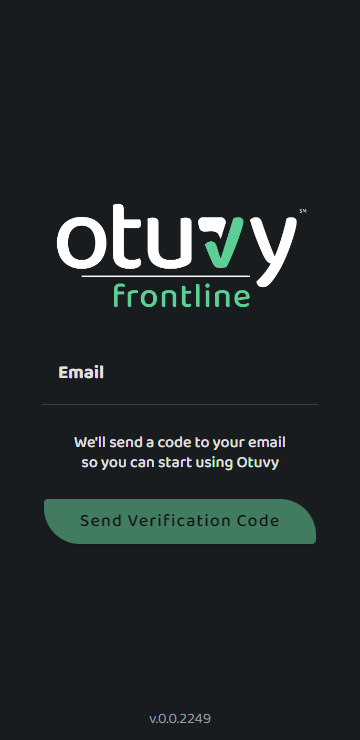
2. Check your email for the verification code. It will come from **support@otuvyfrontline.com**
3. Note that the verification code is only good for 15 minutes and is a one-use code
4. Enter the verification code in the **Code** field and tap **Submit 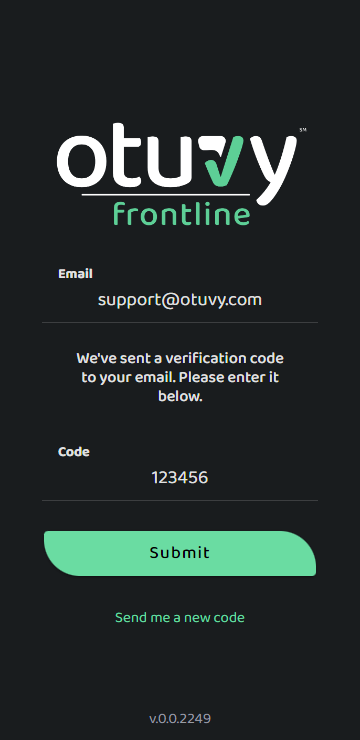**
> 
>
> If you received a verification code but you didn't use it right away, it may no longer work. Remember that the verification code is only good for 15 minutes and one use only. If the time has elapsed or the code doesn't work for any reason, you can use the **Send me a new code** link to get another one emailed to you.
> 
>
> If you haven't received this email, please check any alternative folders in your inbox as well as your junk mail folder.
>
> If after waiting and checking your inbox, secondary folders, and junk mail folder for the verification code you never receive it, there may be a typo in your email address. Contact the admin who set you up and have them check the spelling of your email address.
### First Time Logins
If this is your first time logging into Otuvy Frontline, you will be asked to agree to the Privacy Policy and Terms of Service as well as allow the notification and location permissions for the app.
- [Otuvy QM - Getting Started](https://help.otuvy.com/kb/otuvy-qm-getting-started?hsLang=en)
- [Otuvy QM - Setup & Administration](https://help.otuvy.com/kb/otuvy-qm-setup-administration?hsLang=en)
- [Otuvy QM - Contact Access](https://help.otuvy.com/kb/otuvy-qm-contact-access?hsLang=en)
- [Otuvy QM - Inspections](https://help.otuvy.com/kb/otuvy-qm-inspections?hsLang=en)
- [Otuvy QM - Work Orders](https://help.otuvy.com/kb/otuvy-qm-work-orders?hsLang=en)
- [Otuvy QM - Mobile App](https://help.otuvy.com/kb/otuvy-qm-mobile-app?hsLang=en)
- [Otuvy QM - Reports & Dashboards](https://help.otuvy.com/kb/otuvy-qm-reports-dashboards?hsLang=en)
- [Otuvy QM - Advanced Features](https://help.otuvy.com/kb/otuvy-qm-advanced-features?hsLang=en)
- [Otuvy Frontline](https://help.otuvy.com/kb/otuvy-frontline?hsLang=en#main-content)
- [Getting Started](https://help.otuvy.com/kb/otuvy-frontline?hsLang=en#getting-started)
- [Mobile App](https://help.otuvy.com/kb/otuvy-frontline?hsLang=en#mobile-app)
- [Admin Portal](https://help.otuvy.com/kb/otuvy-frontline?hsLang=en#admin-portal)
- [Uncategorized](https://help.otuvy.com/kb/uncategorized?hsLang=en)
[](https://www.otuvy.com/)
[mailto:email@email.com](mailto:email@email.com)
Copyright © 2026, Otuvy, Inc.