---
title: New Otuvy QM Mobile Experience
description: "See what's new in the Otuvy QM mobile app: redesigned inspections, photo annotation, offline uploads, and faster work order access."
---
[Skip to content](https://help.otuvy.com/kb/new-otuvy-qm-mobile-experience#main-content)
[More support](https://help.otuvy.com/kb/kb-tickets/new?hsLang=en)

Open main navigation
Close main navigation
- [More support](https://help.otuvy.com/kb/kb-tickets/new)
- [Contact us](mailto:vip@otuvy.com)
[Contact us](mailto:vip@otuvy.com)
How can we help you?
- There are no suggestions because the search field is empty.
1. [Otuvy Knowledge Base](https://help.otuvy.com/kb?hsLang=en)
2. [Otuvy QM - Mobile App](https://help.otuvy.com/kb/otuvy-qm-mobile-app?hsLang=en)
# New Otuvy QM Mobile Experience
# New Otuvy QM Mobile Experience
Video Transcript
Okay, we just rolled out a major upgrade to the **Otuvy QM Mobile Experience**, not by adding complexity but by making it faster, clearer, and more powerful in the field.
This update is built around what matters most on-site, doing the work right, fixing issues quickly and proving performance with confidence.
Let me show you what's new.
This is where the biggest upgrades happened, inspections.
Setup is now consolidated into one clean screen.
Select internal or external, choose your templates, apply the filters, hit start.
Inspections are now structured around how supervisors or any inspector actually walk a building.
Services are grouped by area instead of one long scrolling list, which means faster setup and fewer errors.
As you inspect, you can now add multiple details under a single service.
Each detail can have its own photo, its own note, and its own rating.
So if you walk into a restroom, you see three separate issues tied to the same service.
You can document each one clearly.
You can also annotate photos directly inside the app, draw on the image, or add text to show exactly what needs attention.
As you move through the inspection, you'll also see real-time progress in the filter.
You'll know how many services are rated and how many are left.
If you pause and come back later, everything is still there, nothing disappears.
When it's time to finish the inspection, summary and sign-off are now combined into one step.
Uploads happen automatically in the background, and if you're in a low-signal building, inspections queue automatically and retry when service returns.
No stalled uploads, no lost data, and no hesitation to hit save.
Locations are now organized into three simple sections, favorites, downloaded, and not downloaded.
You download only the locations you need for the day.
From each location, you can start an inspection, view reports, refresh data, or manage device storage.
With companies managing dozens or even hundreds of properties, this keeps devices fast and operations clean.
It's control without the clutter.
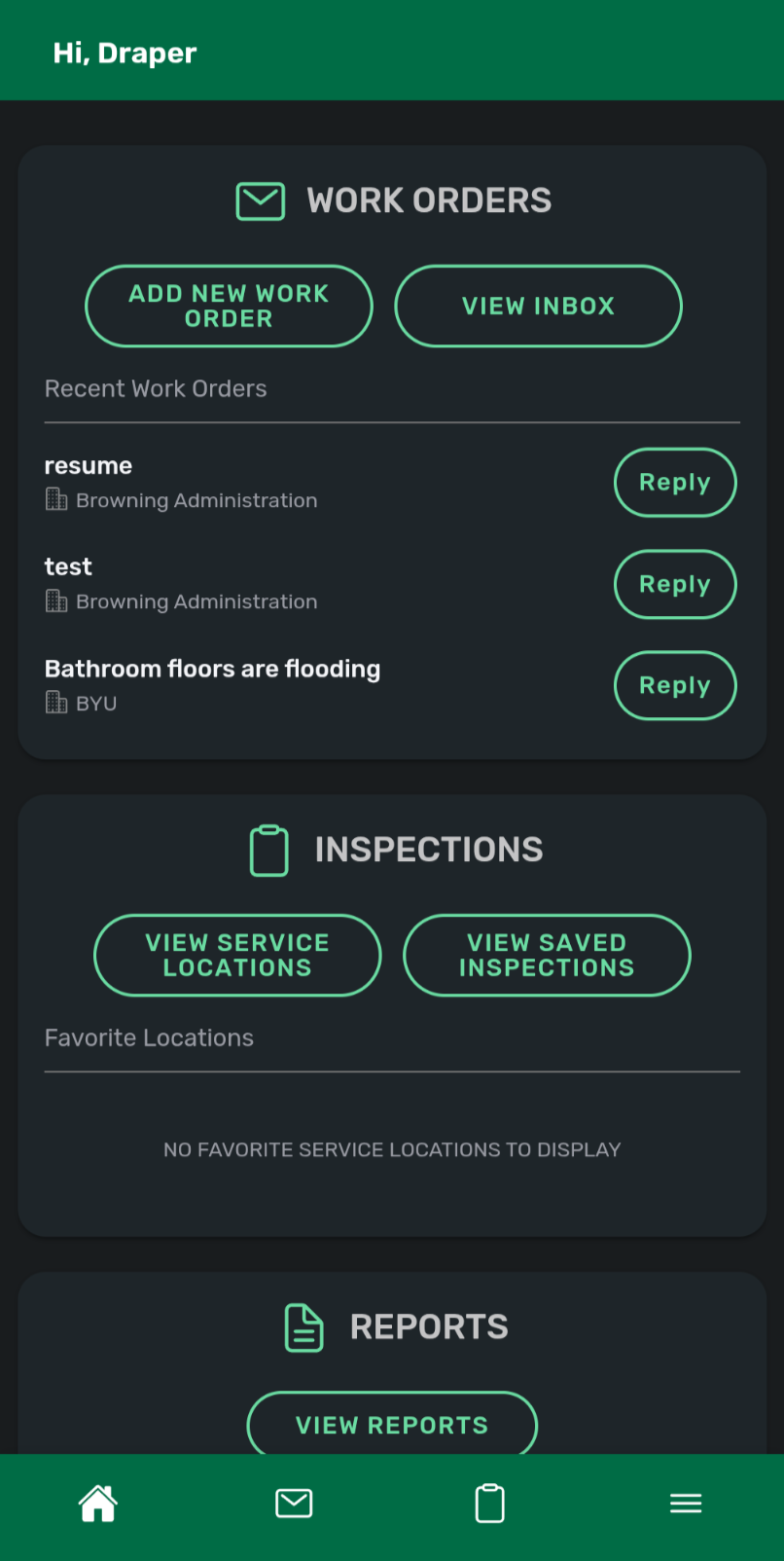
You'll also notice the new permanent bottom navigation bar.
Dashboard, work orders, locations, settings.
One tap between workflows, no more digging.
Reports now are accessible directly from the dashboard as well.
So if a client asks for the last month's score while you're on site, you can pull it immediately.
Now work orders, they're tighter and quicker.
Due dates show right in the inbox, helping reduce missed SLAs.
Tap once and you're inside.
Tap reply and you're responding.
Work orders download on demand, which improves speed for high-volume teams.
Faster response, clearer follow-through.
This upgrade makes inspections stronger, documentation clearer, and response times faster.
So when a client asks, are you actually doing the work?
You don't explain.
You show them.
Welcome to the new **Otuvy QM mobile experience**.
## The New Otuvy QM Mobile Experience Is Here
**What This Means for Your Team**
The new **Otuvy QM** mobile experience keeps the core functionality your team already knows, while improving how quickly and confidently they can execute.
- Inspections are easier to start and follow, structured around real building walkthroughs
- Documentation is stronger, with clearer details, photos, and annotations
- Uploading is seamless, even in low-signal environments
- Work orders and reports are faster to access when you need them
The result is simple. Less time navigating. More time doing the work.
## Built for the Field, Not the Office
Everything in this update was designed around real-world use:
- Move quickly between inspections, work orders, and reports
- Handle multiple issues without slowing down documentation
- Keep progress even when interruptions happen
- Stay productive whether you are online or offline
This is about removing hesitation in the field and giving your team confidence that the system will keep up with them.
## Same Power, Better Execution
One of the most important things to know, nothing about your scoring, reporting, or data will change.
Your dashboards in the **Otuvy QM Service Provider HQ** will remain consistent. Your customers will see the same results.
What will change is how efficiently your team gets there.
This release is focused on modernization without disruption, improving speed, clarity, and reliability while maintaining familiarity.
## What You Should Expect
The Otuvy QM mobile app is available now:
- Download on the [App Store](https://apps.apple.com/us/app/otuvy-qm-v2/id6757811667) for iOS
- Download on [Google Play](https://play.google.com/store/apps/details?id=com.otuvy.inspector.sp0) for Android
- Your team will be up and running quickly with minimal retraining needed
Most teams adopt the experience quickly and confidently.
## Why This Matters
This update is about more than new features.
It is about helping your team move faster, document better, and confidently prove performance.
When your client asks, "Are you actually doing the work?"
You won't need to explain.
You'll be able to show them.
## Got Questions?
We're here to help.
If you have questions about the **Otuvy QM** mobile app or need help getting your team started, reach out to our team anytime.
Email us at [vip@otuvy.com to connect with us or](mailto:vip@otuvy.com)[review our Otuvy QM knowledge base articles.](https://help.otuvy.com/portal/en/kb/otuvy-qm/mobile-app?hsLang=en)
We're happy to walk you through what's new and make sure your team is ready.
- [Otuvy QM - Getting Started](https://help.otuvy.com/kb/otuvy-qm-getting-started?hsLang=en)
- [Otuvy QM - Setup & Administration](https://help.otuvy.com/kb/otuvy-qm-setup-administration?hsLang=en)
- [Otuvy QM - Contact Access](https://help.otuvy.com/kb/otuvy-qm-contact-access?hsLang=en)
- [Otuvy QM - Inspections](https://help.otuvy.com/kb/otuvy-qm-inspections?hsLang=en)
- [Otuvy QM - Work Orders](https://help.otuvy.com/kb/otuvy-qm-work-orders?hsLang=en)
- [Otuvy QM - Mobile App](https://help.otuvy.com/kb/otuvy-qm-mobile-app?hsLang=en)
- [Otuvy QM - Reports & Dashboards](https://help.otuvy.com/kb/otuvy-qm-reports-dashboards?hsLang=en)
- [Otuvy QM - Advanced Features](https://help.otuvy.com/kb/otuvy-qm-advanced-features?hsLang=en)
- [Otuvy Frontline](https://help.otuvy.com/kb/otuvy-frontline?hsLang=en#main-content)
- [Getting Started](https://help.otuvy.com/kb/otuvy-frontline?hsLang=en#getting-started)
- [Mobile App](https://help.otuvy.com/kb/otuvy-frontline?hsLang=en#mobile-app)
- [Admin Portal](https://help.otuvy.com/kb/otuvy-frontline?hsLang=en#admin-portal)
- [Uncategorized](https://help.otuvy.com/kb/uncategorized?hsLang=en)
[](https://www.otuvy.com/)
[mailto:email@email.com](mailto:email@email.com)
Copyright © 2026, Otuvy, Inc.