---
title: What Contacts See When They Login to Otuvy QM
description: "See what Contacts view when logging into Otuvy QM: messages, service locations, surveys, reports, and how permissions set their default screen."
---
[Skip to content](https://help.otuvy.com/kb/what-contacts-see-when-they-login-to-otuvy-qm#main-content)
[More support](https://help.otuvy.com/kb/kb-tickets/new?hsLang=en)

Open main navigation
Close main navigation
- [More support](https://help.otuvy.com/kb/kb-tickets/new)
- [Contact us](mailto:vip@otuvy.com)
[Contact us](mailto:vip@otuvy.com)
How can we help you?
- There are no suggestions because the search field is empty.
1. [Otuvy Knowledge Base](https://help.otuvy.com/kb?hsLang=en)
2. [Otuvy QM - Contact Access](https://help.otuvy.com/kb/otuvy-qm-contact-access?hsLang=en)
# What Contacts See When They Login to Otuvy QM
# What Contacts See When They Login to Otuvy QM
## Video Transcript
Welcome to Otuvy QM guide to the view your Contacts have when they log in. This view is dependent on the **user permissions** you give your contacts. For our purposes today we have given this contact all permissions.
The view contacts have is split into these different tabs at the top. The first section called **Messages** is equivalent to the work order tab for the Service Provider. Here, they can see messages from inspections that have been performed or work orders the service provider has placed. The Contact can also create a new work order by selecting **New Message** or reply to a message by selecting the message, hovering over **Actions** and selecting **Reply**.
The **Service Locations** tab allows the contact the ability to see the locations they are over. When we click on a location, we can see any pertinent information about the location. They can also view past inspections under the *Inspections* section and any job schedules in the *Scheduling* section. They can view any Surveys completed, as well as any work orders for that location.
The **Surveys** tab allows the Contact to fill out any Client Survey’s you give to them and their locations through Custom Question Templates. They simply choose the location they want and select the survey available. These completed surveys will appear on the Service Location record and can generate work orders.
The **Service Provider** tab has your company information for the contact to reach out to the Service Provider.
The **Reports** tab allows the contact to run reports. Some of these reports are covered in the Report and Business Intelligence section of the Knowledge Base.
Finally, the **My Info** tab allows the contact to see their personal information, and they can change things like their username and password by clicking **Edit** next to *User Information*. Thank you for joining us on the journey through what contacts see when they log into the software. Feel free to create a contact record of your own as all contacts are free and this may help familiarize you with the process your contacts will go through.
---
## Contact View Default
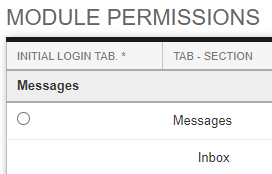
When giving a Contact permissions, the first module they have permission to access will be their default view. Contacts who are given permission to access messages, locations, and surveys will have the New Messages screen as their default when they log in. Other contacts who only have permission to access surveys will have the Survey selection screen as their default when they log in. The default screen can be changed in their permissions page. Selecting the dot next to the module header will make that tab the default.
> 
>
> Module Permissions **and** position within the Org. Chart affect what a contact sees when they log in. Permissions control what they can **do** while Position controls which **locations** they can **see**.
- [Otuvy QM - Getting Started](https://help.otuvy.com/kb/otuvy-qm-getting-started?hsLang=en)
- [Otuvy QM - Setup & Administration](https://help.otuvy.com/kb/otuvy-qm-setup-administration?hsLang=en)
- [Otuvy QM - Contact Access](https://help.otuvy.com/kb/otuvy-qm-contact-access?hsLang=en)
- [Otuvy QM - Inspections](https://help.otuvy.com/kb/otuvy-qm-inspections?hsLang=en)
- [Otuvy QM - Work Orders](https://help.otuvy.com/kb/otuvy-qm-work-orders?hsLang=en)
- [Otuvy QM - Mobile App](https://help.otuvy.com/kb/otuvy-qm-mobile-app?hsLang=en)
- [Otuvy QM - Reports & Dashboards](https://help.otuvy.com/kb/otuvy-qm-reports-dashboards?hsLang=en)
- [Otuvy QM - Advanced Features](https://help.otuvy.com/kb/otuvy-qm-advanced-features?hsLang=en)
- [Otuvy Frontline](https://help.otuvy.com/kb/otuvy-frontline?hsLang=en#main-content)
- [Getting Started](https://help.otuvy.com/kb/otuvy-frontline?hsLang=en#getting-started)
- [Mobile App](https://help.otuvy.com/kb/otuvy-frontline?hsLang=en#mobile-app)
- [Admin Portal](https://help.otuvy.com/kb/otuvy-frontline?hsLang=en#admin-portal)
- [Uncategorized](https://help.otuvy.com/kb/uncategorized?hsLang=en)
[](https://www.otuvy.com/)
[mailto:email@email.com](mailto:email@email.com)
Copyright © 2026, Otuvy, Inc.